Apple’s App-Site Association (AASA) is the small JSON contract behind Universal Links: it tells iOS which HTTPS URLs on your domain may open your app instead of the browser. This article walks through what the file is, where it must live, why HTTPS matters, and how to think about it in a security review, without treating a normal public file like a vulnerability by default.
Official overview from Apple: Universal Links.
Quick takeaways
- AASA links your domain to an iOS app so standard
https:// links can deep-link into the app when appropriate.
- It must be served from a fixed, documented URL over valid HTTPS (no sloppy redirects).
- The file is public configuration, not a CVE, but it can still help testers map routes and identifiers during assessments.
What is AASA?
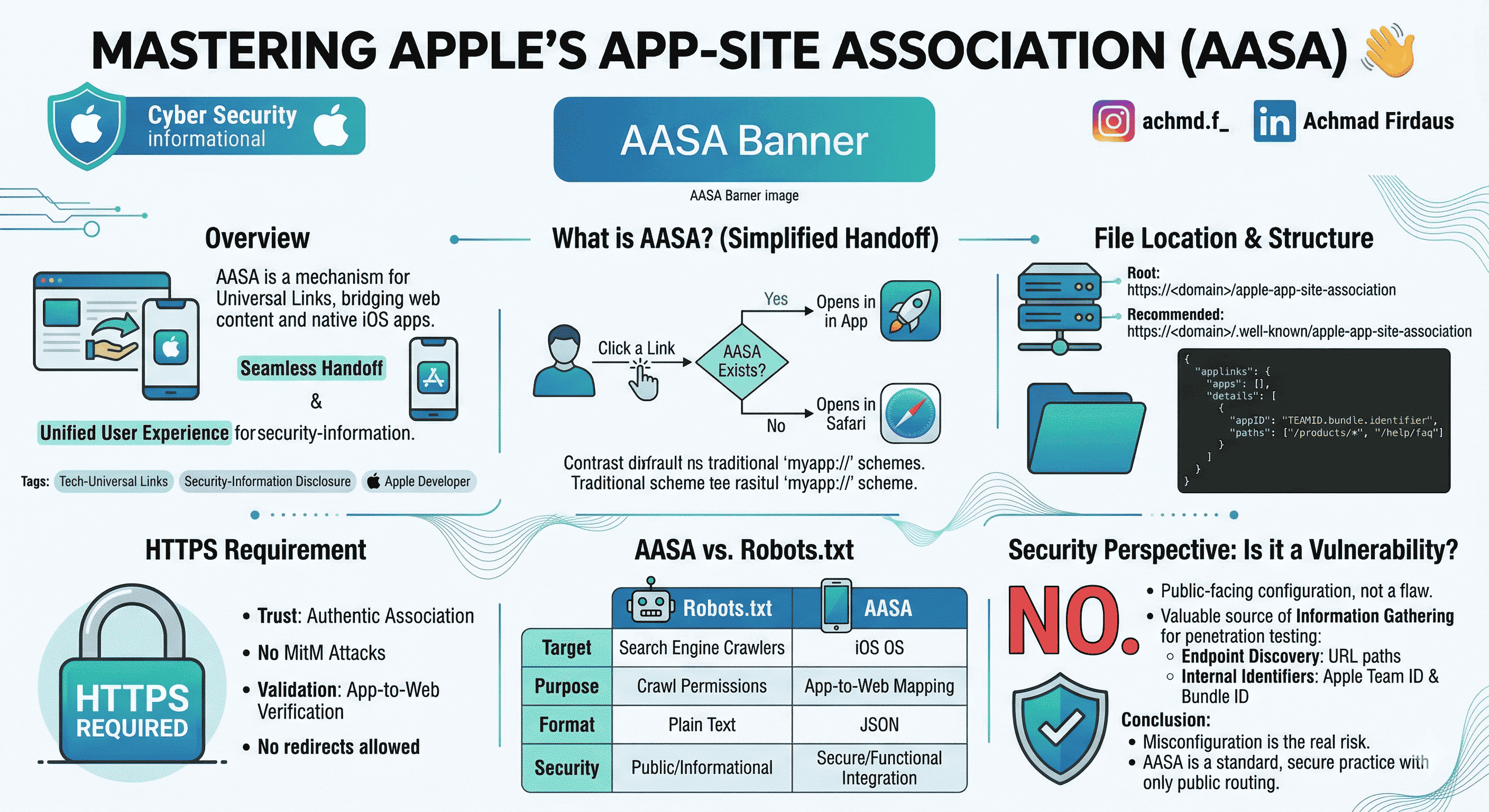
App-Site Association is how iOS decides whether a normal web URL should hand off to your app or stay in Safari (or the user’s default browser). Custom schemes like myapp:// are different: Universal Links use ordinary https:// URLs, which feels seamless for users and keeps one URL for web and app.
When someone taps a link, the system checks whether your domain is associated with an installed app. If the association matches, the app opens; otherwise the link behaves like a regular web URL.
Where the file lives
The filename is exactly apple-app-site-association (no .json suffix). iOS will fetch it from one of:
- Domain root:
https://<your-domain>/apple-app-site-association
- Recommended:
https://<your-domain>/.well-known/apple-app-site-association
Minimal JSON shape
Replace TEAMID and bundle.identifier with your Apple Team ID and app bundle ID.
{
  "applinks": {
    "apps": [],
    "details": [
      {
        "appID": "TEAMID.bundle.identifier",
        "paths": ["/products/*", "/help/faq"]
      }
    ]
  }
}
Why HTTPS is non‑negotiable
iOS downloads this file to verify the app–domain relationship. That only works if the download is trustworthy.
- Integrity: TLS reduces the chance of tampering in transit (for example, on untrusted networks).
- Policy: If the file is not available over valid HTTPS, verification fails and Universal Links will not behave as you expect.
Use a proper certificate, a stable URL, and avoid redirect chains that break Apple’s fetch.
AASA is not robots.txt
People sometimes call AASA “Apple’s robots.txt.” The jobs are different:
robots.txt speaks mainly to search crawlers (indexing hints), in plain text, and is broadly informational.- AASA is for iOS, uses JSON, and participates in verified app–site association over HTTPS.
Both can mention URL paths, but the audience and mechanics are not the same. Do not copy one mental model onto the other.
Security angle: AASA is meant to be fetched by Apple’s ecosystem. It is not, by itself, a “vulnerability” in iOS. In a pentest it can still support information gathering: paths may reveal routing you care about, and you may see Team ID and bundle ID as context, not magic exploits.
Real problems usually come from misconfiguration: mapping sensitive routes, or surprising behavior in the app. Keep entries aligned with routes you intentionally support and document what should open in-app versus the browser.
Closing
Ship Universal Links with the file under .well-known, clean HTTPS, and tests on real devices. Treat AASA as public routing metadata: fine for defenders and testers to read; the fix for risk is good product and config hygiene, not hiding the file.
If you run both an app and a site, maintaining an explicit list of which URLs may open the app pays off every time you change navigation or authentication.